AI music production has moved past simple track generation. Today, producers are directing full vocal performances — tone, texture, emotion, and delivery — with nothing but text. That shift is what makes Suno vocal prompts worth learning properly: the gap between a flat, generic AI vocal and a genuinely moving performance almost always comes down to how specific your prompt is.
This guide breaks down the vocabulary, tagging techniques, and structural habits that separate amateur Suno output from release-ready vocals.
The growing use of AI music tools in classrooms and language learning is even becoming a subject of academic study, underscoring how mainstream this technology has become in creative and educational settings alike.
Skip the trial and error. The Suno Vocal Prompting Ebook hands you the tested prompt formulas and genre-specific templates covered in this guide — ready to paste straight into Suno.
Why Specificity Is the Real Skill
Typing “female singer” tells Suno almost nothing useful. The AI needs direction on timbre, weight, register, age, and emotional inflection to produce something that sounds intentional rather than random.
Recent research into large-scale generative audio models backs this up: prompt specificity correlates directly with how natural and “human” the resulting vocal sounds. The more precisely you describe what you want to hear, the less the model has to guess — and guessing is where flat, generic vocals come from.
If you’re still getting familiar with the basics of prompt structure, our Suno AI prompt guide is a good starting point before diving into vocal-specific techniques.
Vocal Archetypes: The Vocabulary That Actually Works
Vague adjectives give the model too much room to guess. Precise, industry-standard terms give it a target to hit.
- Instead of “sad,” try: melancholy, breathy, intimate
- Instead of “loud,” try: powerful, operatic, belting
- Instead of “soft,” try: hushed, delicate, close-mic’d
- Instead of “energetic,” try: driving, percussive phrasing, urgent
Register Matters More Than You’d Think
Naming a vocal register — soprano, alto, tenor, baritone — keeps the AI anchored to a believable melodic range instead of drifting between octaves mid-line. This is especially useful on longer tracks, where an unanchored vocal can shift register awkwardly between verses and choruses.
Texture Descriptors Are Your Filters
Words like raspy, gravelly, silky, and auto-tuned function almost like audio plugins in prompt form. Stack two or three together (e.g., “raspy, low, smoke-worn”) for a more distinct, less generic result. The more textures you layer, the more the vocal starts to feel like a specific performer rather than a default voice.
A quick before-and-after:
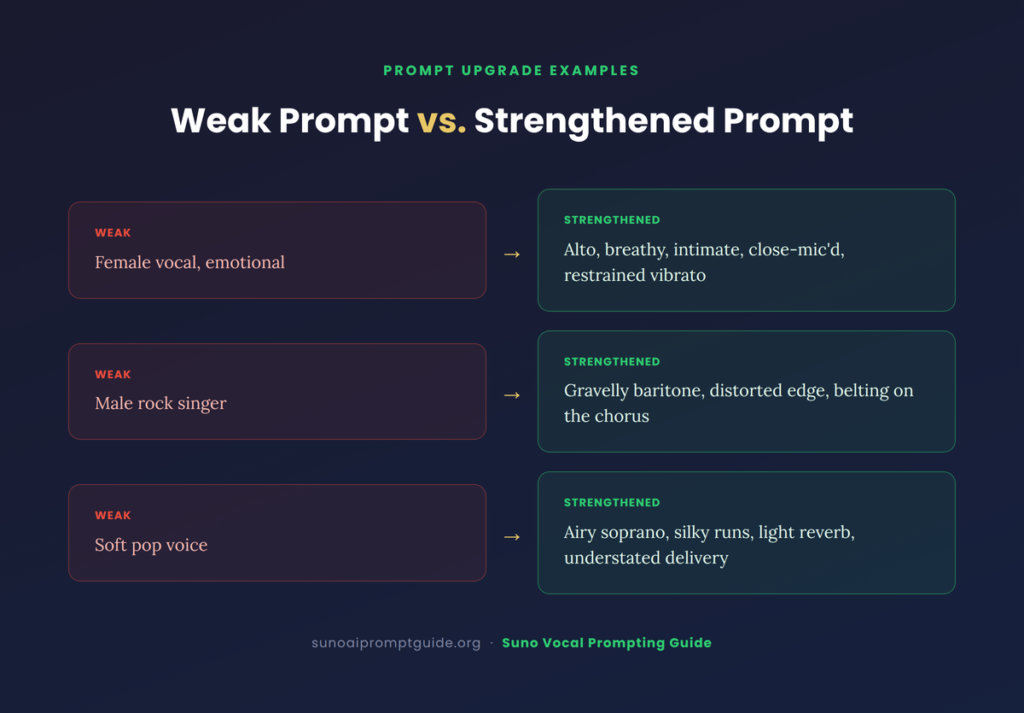
| Weak Prompt | Strengthened Prompt |
|---|---|
| Female vocal, emotional | Alto, breathy, intimate, close-mic’d, restrained vibrato |
| Male rock singer | Gravelly baritone, distorted edge, belting on the chorus |
| Soft pop voice | Airy soprano, silky runs, light reverb, understated delivery |
Want a full library of these formulas broken down by genre? The Suno Vocal Prompting Ebook covers dozens of tested combinations across pop, rock, R&B, worship, and cinematic styles.
Metatagging: Bracket-Based Vocal Direction
Using [brackets] inside your lyrics to issue direct vocal instructions — often called metatagging — gives you scene-by-scene control over delivery. This technique has proven flexible enough to show up in unexpected use cases, including projects using Suno to write and teach vocabulary through song for young English learners.
Metatags work because they interrupt the model’s default flow and give it a fresh instruction at a precise point in the song, rather than a single blanket description applied to the whole track.
The “Whisper” Trick Add [Vocal: ASMR whisper] before a line to push the model toward lower gain and increased breathiness — ideal for intimate, cinematic moments or a stripped-down bridge section.
Controlling Gender and Pitch Phrases like “deep baritone male” or “high-pitched boy soprano” let you dial in specific frequency ranges rather than leaving gender and pitch to chance.
Dynamic Shifts Mid-Song You don’t have to lock in one vocal style for the entire track. Try tagging a quiet verse with [Vocal: hushed, close] and the following chorus with [Vocal: powerful, belting] to build contrast the way a real vocal arrangement would.
Ad-Libs and Runs For genres like R&B or gospel, adding [ad-lib: soft riff] at the end of a line can prompt short melodic flourishes that make a track feel less templated and more performed.
Keep Your Style Box and Lyrics Box in Sync
A common mistake: writing rich, descriptive lyrics while leaving the Style of Music box generic (or vice versa). Suno reads both fields together, so mismatched signals produce muddier results.
Regional and cultural vocal nuance — a specific ad-lib style, a folk inflection, a language-specific cadence — is increasingly achievable when both fields reinforce the same direction, a trend reflected in recent academic coverage of AI-assisted music composition across different cultural contexts. If your Style box says “Afrobeat” but your lyrics box gives no phrasing or rhythmic cues, you’re leaving quality on the table.
A simple sync check before you generate:
- Does the Style box name the genre and a vocal quality (not just genre alone)?
- Do the lyrics include at least one metatag reinforcing that vocal quality?
- Would a producer reading both fields together know what voice to expect?
If you answer “no” to any of these, you’re likely to get an inconsistent result.
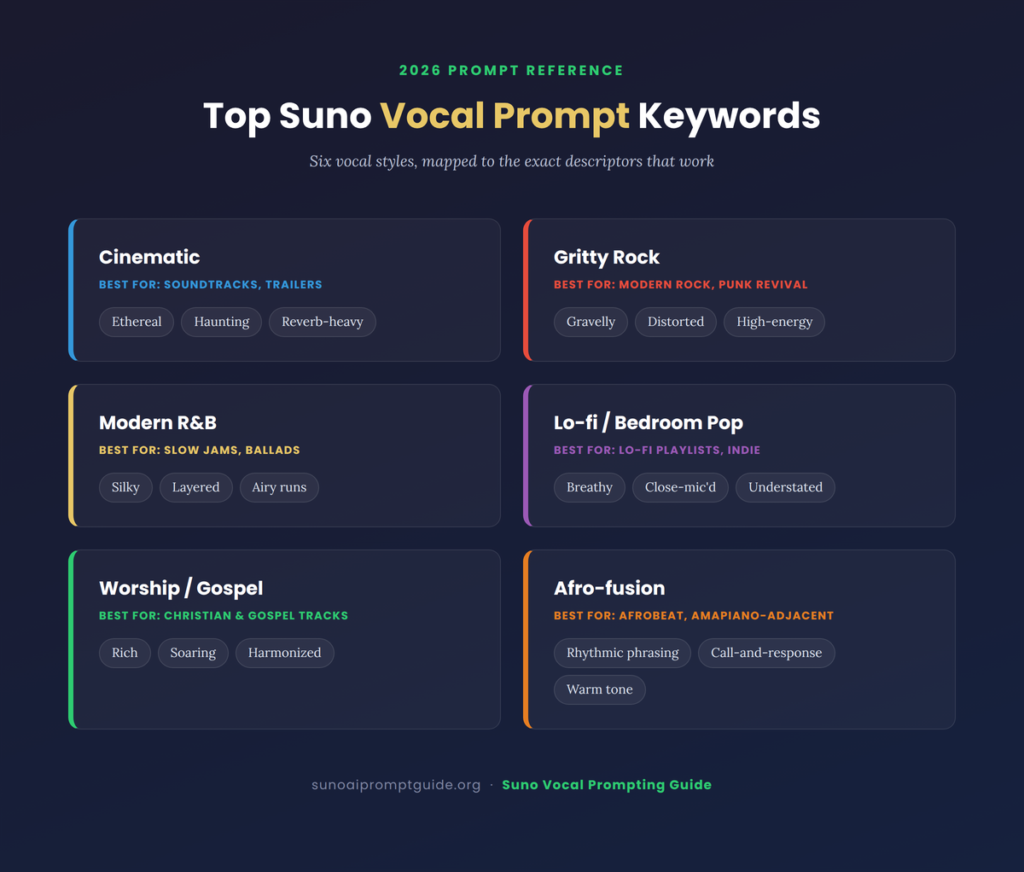
Top Vocal Prompt Keywords for
| Vocal Style | Recommended Keywords | Best For |
|---|---|---|
| Cinematic | Ethereal, haunting, reverb-heavy | Soundtracks, trailers |
| Gritty Rock | Gravelly, distorted, high-energy | Modern rock, punk revival |
| Modern R&B | Silky, layered, airy runs | Slow jams, ballads |
| Lo-fi / Bedroom Pop | Breathy, close-mic’d, understated | Lo-fi playlists, indie |
| Worship / Gospel | Rich, soaring, harmonized | Christian and gospel tracks |
| Afro-fusion | Rhythmic phrasing, call-and-response, warm tone | Afrobeat, Amapiano-adjacent |
For a deeper breakdown of genre-specific vocal formulas — including the exact tag combinations used in each row above — the Suno Vocal Prompting Ebook is built to be pasted directly into your prompt box.
Common Mistakes That Flatten Your Vocals
Even experienced Suno users fall into a few recurring traps:
- Stacking contradictory descriptors — “powerful, whispery” sends mixed signals and often produces an unstable result. Pick a lane, then layer nuance within it.
- Over-tagging a single line — three or four metatags crammed into one lyric line can confuse the model. Space instructions out across sections instead.
- Ignoring song structure — a vocal prompt that works for a verse rarely works unchanged for a chorus or bridge. Treat each section as its own mini-brief.
- Skipping regeneration — Suno is probabilistic. The first output rarely nails a highly specific prompt; budget for two or three regenerations per section.
Building a Vocal Prompt Step by Step
If the sections above feel like a lot to hold in your head at once, here’s a repeatable process for building a strong vocal prompt from scratch:
1. Start with the emotional core. Before touching timbre or texture, decide what the listener should feel on first playback — longing, defiance, celebration, grief. Everything else in the prompt should serve that emotion.
2. Pick a register and one anchor texture. Choose a register (soprano, alto, tenor, baritone) and a single dominant texture (breathy, gravelly, silky). This becomes your baseline — the voice’s “home base” before you add nuance.
3. Layer two or three supporting descriptors. Add secondary qualities that refine, not contradict, your anchor texture. “Breathy, intimate, restrained vibrato” builds on “breathy” rather than fighting it.
4. Map the arrangement section by section. Decide where the vocal should shift — a hushed verse, a soaring chorus, a stripped bridge — and plan metatags for each transition rather than one blanket instruction for the whole song.
5. Sync your Style box and lyrics. Confirm the genre and vocal quality named in your Style box are reinforced somewhere in your lyrics or metatags, using the sync check from earlier in this guide.
6. Generate, listen, and isolate what’s wrong. On the first pass, resist the urge to rewrite the whole prompt. Identify the one element that’s off — usually register, texture, or a mistimed metatag — and adjust only that before regenerating.
Producers who follow this sequence consistently report needing fewer regenerations to land on a usable take, simply because each prompt element is doing one clear job instead of competing with the others.
Why Most Vocal Prompts Fail on the First Try
It’s worth understanding why generic prompts underperform, not just that they do. Suno’s model is trained to fill in gaps with the statistically “safest” interpretation of your words. A prompt like “emotional female vocal” has thousands of plausible interpretations, so the model defaults to the most average one — which is exactly why it sounds generic.
Specific, layered prompts narrow that probability space dramatically. Every additional precise descriptor removes ambiguity and pushes the output closer to a distinct, intentional performance rather than a statistical average. This is the same underlying principle that shows up in generative audio research more broadly: constraint, applied correctly, is what produces character.
That’s also why copying someone else’s exact prompt rarely reproduces their result — small differences in lyric phrasing, song length, or Style box wording shift the probability space just enough to change the outcome. Understanding the principles behind a good prompt matters more than memorizing one that worked for someone else.
The Legal and Ethical Side of AI Vocals
As AI-generated music moves into the mainstream, intellectual property questions are getting more scrutiny, not less. Legal scholars have published extensive analysis on how copyright frameworks are adapting to generative audio tools.
If your goal is original, ownable work, one practical habit matters more than almost anything else: learning how to avoid artist name tags on Suno AI, so your prompts don’t accidentally lean on a real artist’s name or style in a way that creates legal or ethical risk.
This matters just as much for vocal prompting as it does for instrumentation. Describing a voice as “sounds like [Artist Name]” is both legally risky and, from a craft standpoint, a shortcut that keeps you from developing your own descriptive vocabulary. Every technique in this guide is designed to get you a distinctive vocal without ever needing to reference a real performer.
Frequently Asked Questions
What’s the fastest way to improve my Suno vocal prompts? Replace single vague adjectives with two or three specific, stacked descriptors (texture + register + emotion). This alone produces a noticeably more controlled result than generic prompting.
Do metatags like [Vocal: whisper] always work? They significantly increase the odds of the intended effect, but Suno is probabilistic — expect to regenerate a few times per section, especially for subtle effects like whispering or ad-libs.
Should my Style box and Lyrics box always match? They don’t need to be identical, but they should reinforce the same emotional and stylistic direction. Conflicting signals between the two are one of the most common causes of muddy or unpredictable vocal output.
Is it legal to prompt for a specific artist’s voice? Naming a real artist directly is both an ethical and increasingly a legal risk. Use descriptive, style-based language instead — this guide’s artist-tag guide covers safer alternatives.
How many metatags is too many? As a rule of thumb, no more than one or two per lyric line. Beyond that, the model tends to blend or ignore instructions rather than execute all of them cleanly.
Final Thoughts
Vocal prompting is quickly becoming its own discipline within AI music production — closer to directing a session vocalist than typing a search query. The producers getting the most consistent, professional-sounding results are the ones treating their prompts like a performance brief: register, texture, emotion, and delivery, all specified up front, section by section.
Ready to skip the trial and error? The Suno Vocal Prompting Ebook includes tested prompt formulas and genre-specific templates so you can go straight from idea to finished vocal — no guesswork required.